

3.2 Building Custom Python Agents#
Now let’s see how we can enhance the capabilities of LLMs with added tools. Here we focus on how to deploy a flexible, open-source, python-based agent. Here we will be using Aviary, an extensible gymnasium for defining agent environments and LDP a framework for defining language agents. With these packages you have more freedom to customize agents and use opensource language models.
All FutureHouse agents including PaperQA2 and Finch are implemented using Aviary and LDP.
🚀 How to run the notebook
This tutorial can be launched using the rocket (🚀) button at the top of the page.
Option 1 — Google Colab (recommended)#
Opens the notebook in Google Colab with the fastest and most reliable experience.
Before running the tutorial, add your API keys using either:
a
.envfile, orColab Secrets (
🔑 Secretstab in the left sidebar)
Example .env:
OPENAI_API_KEY=your_key_here
ANTHROPIC_API_KEY=your_key_here
Option 2 — MyBinder#
Launches a temporary cloud Jupyter environment directly in your browser.
⚠️ Binder environments can take a few minutes to build and start.
After the notebook loads, create a .env file in the notebook directory containing your API keys:
OPENAI_API_KEY=your_key_here
ANTHROPIC_API_KEY=your_key_here
Notes#
You only need API keys for the providers used in a given notebook.
Never commit or publicly share your API keys.
If a cell fails due to missing credentials, verify that your keys were loaded correctly before rerunning the cell.
3.2.1 Problem setup#
The goal of this tutorial is to build an AI agent that can analyze protein data and generate hypotheses for drug discovery.
When you understand the basic workflow, you will be able to design and build your own agents.
If you’re using a Google Colab notebook, you can install the requirements by running the cell below.
!uv pip install fhaviary ldp pydantic openai biopython==1.86
Next, you have to setup an OpenAI API key. If you’re using an opensource LLM, then you should replace the OpenAI client and model names in the following cells.
import os

LLM_API_KEYS = {
    "openai":    "OPENAI_API_KEY",
    "anthropic": "ANTHROPIC_API_KEY",
}

def get_api_key(llm: str = "openai") -> str:
    """
    Load API key for the specified LLM from Colab secrets,
    environment variable, or user input.

    Args:
        llm: LLM provider name. eg: 'openai', 'anthropic'

    Returns:
        API key string

    Example:
        api_key = get_api_key("anthropic")
    """

    llm = llm.lower()
    if llm not in LLM_API_KEYS:
        raise ValueError(
            f"Unknown LLM '{llm}'. Choose from: {list(LLM_API_KEYS.keys())}"
        )

    env_var = LLM_API_KEYS[llm]

    # 1. Try Colab secrets
    try:
        from google.colab import userdata
        key = userdata.get(env_var)
        if key:
            return key
    except ImportError:
        pass

    # 2. Try environment variable / .env file
    try:
        from dotenv import load_dotenv
        load_dotenv()
        key = os.environ.get(env_var)
        if key:
            return key
    except ImportError:
        pass

    raise ValueError(
        f"API key not found. Please set {env_var}:\n"
        f"  export {env_var}='your-key-here'\n"
        f"  or add it to a .env file"
    )

# Set the API key as an environment variable
os.environ["OPENAI_API_KEY"] = get_api_key("openai")
3.2.2 Define the tools#
As we discussed previously, tools are Python functions our agent can choose to call. Each tool is a python function.
We give each tool a name, a description (so the AI understands what it does), and a list of inputs it expects. In this example we’ll build two tools:
analyze_protein_sequence— computes basic biophysical propertiessummarize_protein_role— asks the AI to summarize biological context. We’ll use an OpenAI model to do this, but you can also use an opensource LLM here.
An important note to add is that when you define a tool with Aviary it must contain a docstring with function description. See the example tool definitions below.
Here are a few brief definitions of key classes and concepts from Aviary and LDP for referral:
From Aviary
Message: Used by language agents and environments for communication. Messages include attributes like content ot role (system, user, assistant, tool ), matching OpenAI’s conventions.
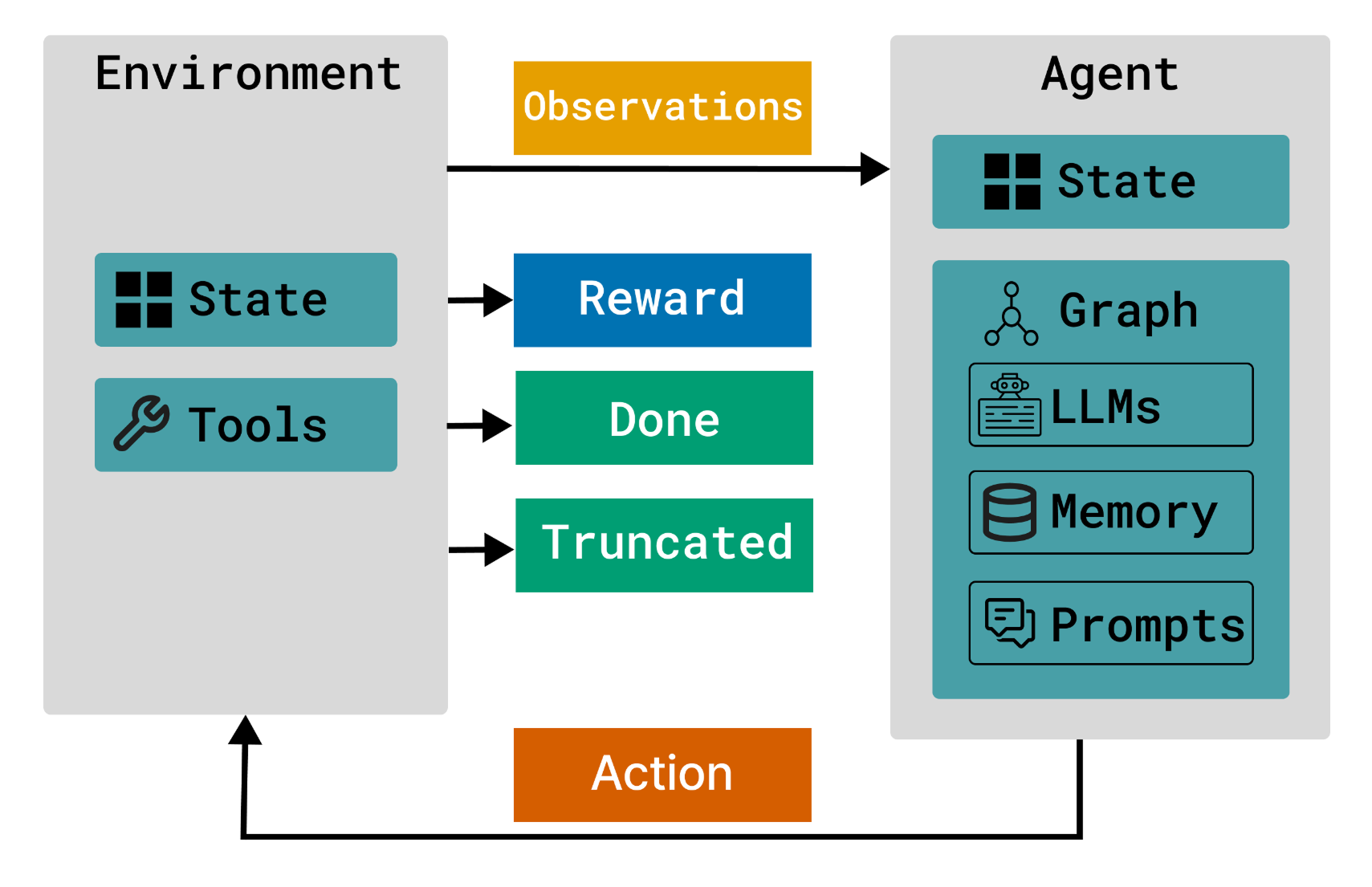
Environment: An environment is a stateful system or “world” where an agent operates by taking actions. In Aviary, these actions are called tools. The environment presents states that the agent observes (totally or partially), prompting it to use tools to affect outcomes. Each action taken yields a reward and leads to a new state.
Tool: Defines an environmental tool that an agent can use to accomplish its task. Each environment contains its own set of tools. Most tools take arguments and tools can be called in parallel.
ToolRequestMessage: This is a specialized subclasses of Message used for tool requests. Typically, a language agent sends a ToolRequestMessage to the environment to request the execution of a specific tool. The role of ToolRequestMessage is always assistant.
From LDP
Agent: An entity that interacts with the environment, mapping observations to tool request actions.
Op: Represents an operation within the agent. LDP includes various operations (Ops), such as API LLM calls, API embedding calls, or PyTorch module handling. These operations form the compute graph.
OpResult: the output of an Op.
Now let’s write the python functions to define the two tools.
from Bio.SeqUtils.ProtParam import ProteinAnalysis
from openai import OpenAI

# ── TOOL 1: Analyze a protein sequence ──────────────────────────────────────

def analyze_protein_sequence(sequence: str) -> dict:
    """
    A tool to analyze a protein sequence.
    Use when you need to get basic biophysical properties of a protein.
    eg: molecular weight, isoelectric point, instability index, gravy score, etc.

    Args:
        sequence: The protein sequence to analyze
    Returns:
        A dictionary containing the biophysical properties of the protein.
    """

    sequence = sequence.upper().strip()
    analysis = ProteinAnalysis(sequence)

    results = {
        "length":              len(sequence),
        "molecular_weight_Da": round(analysis.molecular_weight(), 2),
        "isoelectric_point":   round(analysis.isoelectric_point(), 2),
        "instability_index":   round(analysis.instability_index(), 2),
        "gravy_score":         round(analysis.gravy(), 3),   # hydrophobicity
        "amino_acid_percent":  {
            aa: round(pct, 1)
            for aa, pct in analysis.amino_acids_percent.items()
            if pct > 0   # only show amino acids actually present
        },
    }

    # Interpret some values for the non-expert
    results["is_stable"]     = results["instability_index"] < 40
    results["is_hydrophilic"] = results["gravy_score"] < 0

    return results


# ── TOOL 2: Summarize protein biological role ────────────────────────────────

def summarize_protein_role(protein_name: str, organism: str, protein_data: dict | None = None) -> str:
    """
    A tool to summarize the biological
    role of a protein from its training knowledge.
    eg: biological function, disease or condition it is associated with, why it is considered a drug target.

    Args:
        protein_name: The name of the protein to summarize
        organism: The organism the protein belongs to
        protein_data: A dictionary containing the protein data
    Returns:
        A string containing the summary of the protein's biological role.
    """

    client = OpenAI(api_key=get_api_key(llm="openai"))
    response = client.responses.create(
    model="gpt-4.1-nano-2025-04-14",
    input= (
                f"Provide a concise 3–4 sentence summary of the protein '{protein_name}' "
                f"in {organism}. Here is the protein data: {protein_data}\n. Cover: (1) its biological function, "
                f"(2) which disease or condition it is associated with, "
                f"(3) why it is considered a drug target. Be factual and concise."
            ),
    )

    return response.output_text

def submit_final_answer(answer: str) -> str:  # noqa: RUF029
    """
    A tool to submit the final answer to the user.

    Args:
        answer: The answer to the query.
    Returns:
        True if the answer is submitted, False otherwise
    """

    return answer
3.2.3 Define the environment#
Next we define a simple state and environment where an agent takes actions to modify analyze a protein.
💡 Reminders
The State is a snapshot of the agent’s current situation. ie. what the agent knows at a given timestep.
The Environment is everything outside the agent itself — it’s the world the agent perceives and acts upon.
from typing import cast
from aviary.core import (
    Environment,
    Message,
    Messages,
    Tool,
    ToolRequestMessage,
    ToolResponseMessage,
)
from pydantic import BaseModel

SYSTEM_PROMPT = """
You are an expert researcher. You are given a research question, Your task is to answer the question. You have access to the following tools:
- analyze_protein_sequence: to analyze the protein
- summarize_protein_role: to summarize the biological role of the protein
- submit_final_answer: to submit the final answer

Prompt: \n{query}\n
"""

class DemoEnvState(BaseModel):
    """State of the EvalAgent."""

    query: str
    answer: str | None = None
    done: bool = False

class DemoAgentEnv(Environment[DemoEnvState]):
    """Environment for the DemoAgent."""

    def __init__(
        self,
        query: str, # the input to the agent
    ):
        self.query = query
        self.tools: list[Tool] = []
        self.messages: Messages | None = None

    def make_initial_state(self) -> DemoEnvState:
        """
        This initializes the state of the agent
        i.e., where the agent at the beginning of the task
        you can add more fields to the state if you want
        """
        return DemoEnvState(
            query=self.query,
            answer=None,
            done=False
        )

    async def reset(self) -> tuple[Messages, list[Tool]]:
        """
        Reset the environment and collect initial observation(s).
        Possible observations could be instructions
        on how tools are related,
        or the goal of the environment.
        should return a two-tuple of initial observations and tools
        """
        self.messages = [
            Message(content=SYSTEM_PROMPT, role="system"),
            Message(content=self.query),
        ]
        self.tools = [
            Tool.from_function(analyze_protein_sequence),
            Tool.from_function(summarize_protein_role),
            Tool.from_function(submit_final_answer),
        ]

        self.state = self.make_initial_state()
        return self.messages, self.tools

    async def step(
        self, action: ToolRequestMessage
    ) -> tuple[Messages, float, bool, bool]:
        response_messages = cast(
            "Messages",
            await self.exec_tool_calls(
                action,
                concurrency=False,
                handle_tool_exc=True,
                state=self.state,
            ),
        ) or [Message(content=f"No tool calls input in tool request {action}.")]

        done = any(
            isinstance(msg, ToolResponseMessage)
            and msg.name == submit_final_answer.__name__
            for msg in response_messages
        )
        self.intermediate_answer = response_messages[-1].content
        if done:
            self.state.done = True

        return (
            response_messages,
            1 if self.state.done else 0,
            self.state.done,
            False,
        )
3.2.4 Initialize the agent#
Now we have setup our environment. Now we have to have an agent (an LLM) to use the tools and come up with an answer. The ldp package has pre-defined Simple and ReAct agents which you can implement. You can refer to this GitHub repo for more details on agent implementation.
from pydantic import BaseModel, Field
from ldp.agent import Agent
from ldp.alg import RolloutManager
from ldp.graph import LLMCallOp

from aviary.core import ToolRequestMessage

from aviary.core import Message, Tool


class AgentState(BaseModel):
    """Simple bucket to store available tools and previous messages."""

    tools: list[Tool] = Field(default_factory=list)
    messages: list[Message] = Field(default_factory=list)


class SimpleAgent(Agent):
    def __init__(self, **kwargs: dict) -> None:
        self._llm_call_op = LLMCallOp(**kwargs)

    async def init_state(self, tools: list[Tool]) -> AgentState:
        return AgentState(tools=tools)

    async def get_asv(
        self, agent_state: AgentState, obs: list[Message]
    ) -> tuple[ToolRequestMessage, AgentState, float]:
        """Take an action, observe new state, return value."""
        action: ToolRequestMessage = await self._llm_call_op(
            config={"name": "gpt-4o-mini", "temperature": 0.1},
            msgs=agent_state.messages + obs,
            tools=agent_state.tools,
        )
        new_state: AgentState = AgentState(
            messages=agent_state.messages + obs + [action.value],
            tools=agent_state.tools,
        )
        # Return action, state, value
        return action, new_state, 0.0
Let’s initiate the agent and perform rollouts on the environment!
Note: If max_steps is set, rollouts will be truncated at this value. If a rollout has fewer than max_steps, then a new environment will be constructed and another rollout will be started until max_steps is reached.
# initate the agent
agent = SimpleAgent()
runner = RolloutManager(agent=agent)

# Define the query
query = """What is the biological role of the protein with PDB id 9RIP? Please analyze this protein and help me think about potential small-molecule drug targeting strategies."""

# Perform rollouts
trajectories: list[tuple] = await runner.sample_trajectories(
    environments=[DemoAgentEnv(query=query)], # must be a list of environments. Can add multiple environments to run in parallel
    max_steps = 5, # max number of steps to run for each environment
)
Now let’s print the final answer from the last tool call in the last step. That’s why we’re using steps[-1].
Here there’s only 1 trajectory as we ran the agent in only 1 environment. So it doesn’t matter if we do trajectories[0] or trajectories[-1]. But you can run multiple environments and get the tool calls from each trajectory.
for example we can run 2 agents in parallel with:
trajectories: list[tuple] = await runner.sample_trajectories(
    environments=[
        DemoAgentEnv(query=query_1),
        DemoAgentEnv(query=query_2)
        ],
)
# Print the tool calls from the last step of the last trajectory
tool_calls = trajectories[-1].steps[-1].action.value.tool_calls

# Get the answer from submit_final_answer tool call
for tc in tool_calls:
    if tc.function.name == "submit_final_answer":
        print(tc.function.arguments["answer"])