

2.2 Extracting Information from Literature#
In all scientific fields, a large portion of knowledge is published in unstructured text such as research articles, reviews, and supplementary materials. Important information about genes, proteins, experimental methods, and biological interactions is often embedded within this text rather than stored in structured databases.
As the volume of scientific literature continues to grow rapidly, manually extracting and organizing this information becomes increasingly difficult and time-consuming. Therefore, automating data extraction from the literature using AI can help researchers to rapidly identify relevant findings, convert unstructured text into structured datasets, and integrate knowledge across thousands of publications.
🚀 How to run the notebook
This tutorial can be launched using the rocket (🚀) button at the top of the page.
Option 1 — Google Colab (recommended)#
Opens the notebook in Google Colab with the fastest and most reliable experience.
Before running the tutorial, add your API keys using either:
a
.envfile, orColab Secrets (
🔑 Secretstab in the left sidebar)
Example .env:
OPENAI_API_KEY=your_key_here
ANTHROPIC_API_KEY=your_key_here
Option 2 — MyBinder#
Launches a temporary cloud Jupyter environment directly in your browser.
⚠️ Binder environments can take a few minutes to build and start.
After the notebook loads, create a .env file in the notebook directory containing your API keys:
OPENAI_API_KEY=your_key_here
ANTHROPIC_API_KEY=your_key_here
Notes#
You only need API keys for the providers used in a given notebook.
Never commit or publicly share your API keys.
If a cell fails due to missing credentials, verify that your keys were loaded correctly before rerunning the cell.
2.2.1 Accessing LLMs through APIs#
You might have used LLMs through chat interfaces such as ChatGPT or Claude before. But to access them through a python code as what we have here, we need to use an API.
API (Application Programming Interface): This is the mechanism that enables seamless communication and data exchange between different software systems (ie. OpenAI model and your program). An API had definitive functions, data formats, and protocols for interaction.
API Key: A unique string to authenticate the user. In this example let’s use a GPT model. For this, you need an API key from OpenAI. You can get your key from OpenAI platform..
These APIs are set as secrets because we do not want to expose these private keys to the public.
1) Set your API key
If you’re using this notebook as a Google Colab notebook, follow the instruction below.
Once you have received a unique API key from OpenAI (or another provider), setup the API keys by clicking key icon on the left tab. More info here
Alternatively, you can add a key to your environment. For example add a
.envfile to the root directory and add all the api keys. Or doexport OPENAI_API_KEY='your-key-here'
If you’re using the Live Coding option, make sure to input your API when prompted.
This notebook is written to work with all above cases.
2) If you’re using Google Colab install the requirements by running the cell below.
!uv pip install openai pandas matplotlib requests datasets trl peft nltk rank_bm25 ipywidgets
To test if you have set the key correctly, run the following code snippet. The output should print your API key.
Note: You may simply swap the language models and clients in the following examples if you wish to use a different model/provider.
💡 Tip
Think of both “secrets” and “environment variables” as ways to store sensitive information (like API keys or passwords) outside your main code so you don’t accidentally expose them.
The difference is mostly about how they’re managed and where they live.
Environment variables = sticky notes on your computer that programs can read
Colab secrets = a locked vault provided by Google specifically for sensitive data
import os

LLM_API_KEYS = {
    "openai":    "OPENAI_API_KEY",
    "anthropic": "ANTHROPIC_API_KEY",
}

def get_api_key(llm: str = "openai") -> str:
    """
    Load API key for the specified LLM from Colab secrets,
    environment variable, or user input.

    Args:
        llm: LLM provider name. eg: 'openai', 'anthropic'

    Returns:
        API key string

    Example:
        api_key = get_api_key("anthropic")
    """

    llm = llm.lower()
    if llm not in LLM_API_KEYS:
        raise ValueError(
            f"Unknown LLM '{llm}'. Choose from: {list(LLM_API_KEYS.keys())}"
        )

    env_var = LLM_API_KEYS[llm]

    # 1. Try Colab secrets
    try:
        from google.colab import userdata
        key = userdata.get(env_var)
        if key:
            return key
    except ImportError:
        pass

    # 2. Try environment variable / .env file
    try:
        from dotenv import load_dotenv
        load_dotenv()
        key = os.environ.get(env_var)
        if key:
            return key
    except ImportError:
        pass

    raise ValueError(
        f"API key not found. Please set {env_var}:\n"
        f"  export {env_var}='your-key-here'\n"
        f"  or add it to a .env file"
    )
LLMs through API requests#
This example show you how to use a GPT model in a python program. Unlike using chatGPT, the API access of the models provides more flexibility.
from openai import OpenAI

# Access the OpenAI API key
openai_api_key = get_api_key("openai")
# Tell the OpenAI client to use your API key
client = OpenAI(api_key=openai_api_key)
# LLM model to generate answer. Replace model name if deprecated
LLM_MODEL = "gpt-4.1-nano"
# Add your question here
QUESTION = "What is the difference between Machine Learning and Deep Learning?"

# You send a request to the model with a query
response = client.responses.create(
    model=LLM_MODEL,
    input= QUESTION,
)

# The response is a text string
print(response.output_text)
2.2.2 Information retrieval from published papers#
Can LLMs alone be useful in science?
LLMs on their own can be used to do certain tasks such as writing essays, summarize text, etc. But LLMs might fail to answer domain specific questions without additional information. Or in cases where you need factually correct answers. eg: What genes are associated with Vascular Ehlers-Danlos syndromes (vEDS)?
Most times LLMs will try to provide some answer (with confidence) although they’re wrong. These are called hallucinations.
You can define hallucinations as incorrect and misleading results that AI models generate.
Common approaches to reduce hallucinations:
Consensus sampling: generate answers multiple times by a model and accept the answer with highest mode
Using verification methods: You can use a python function to verify the generated answer
Integrate additional capabilities (tools) to LLMs: an LLM that can browse the internet.
Background: Retrieval-Augmented Generation (RAG)#
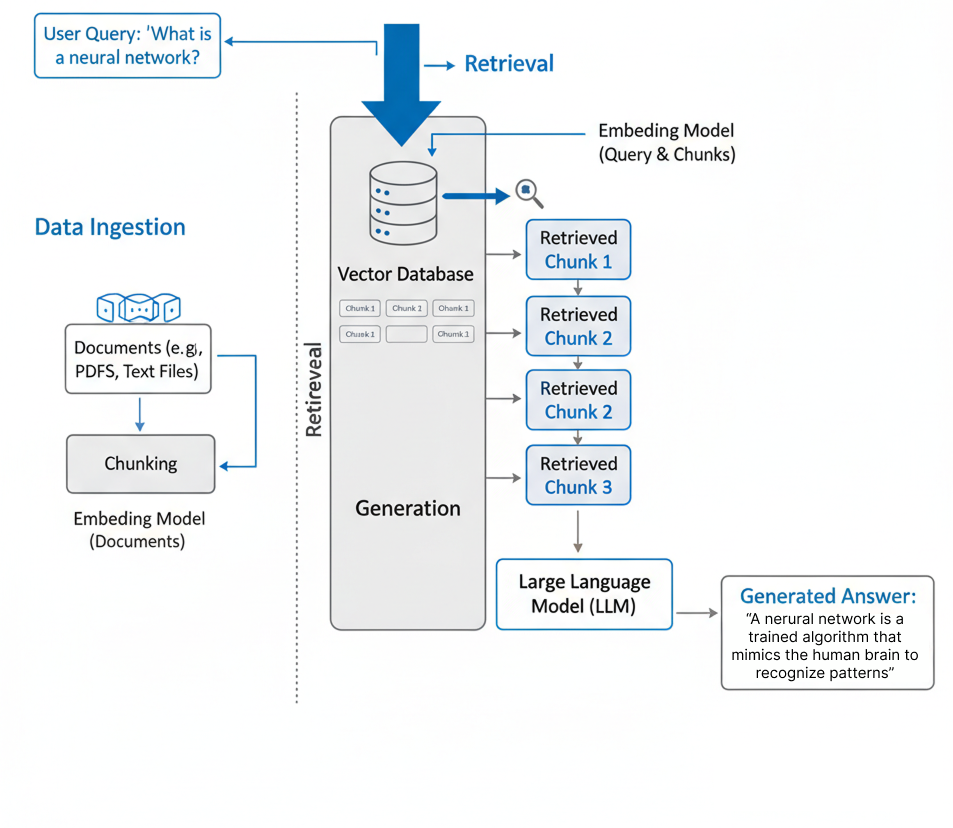
Retrieval-Augmented Generation (RAG) [LPP+21] is one such approach to reduce the hallucinations in LLM and generate evidence based answers. RAG pipeline improves the accuracy and reliability of answers generated by LLMs through retrieving information from external sources before outputting a response.
Instead of relying solely on the model’s internal knowledge, a RAG system retrieves information from external knowledge sources such as scientific papers and databases to find relevant information. The retrieved content is then provided to the language model, which processes this information to generate a more accurate and context-aware answer. Read more on RAG here.
By combining information retrieval with language generation, RAG systems can reduce hallucinations, incorporate up-to-date knowledge, and provide responses grounded in real documents.
Key steps in RAG:
Create/connect knowledge base
Retrieving relevant documents
Using a language model to generate insights
Post-processing the results
Step 1: Knowledge Base Construction#
First, we need access to a knowledge base. This could be a locally existing folder of PDF files or an online database.
In RAG documents are stored as vectors because it makes them easy to search based on meaning rather than exact wording. A vector is just a list of numbers that represents the semantic content of a piece of text, so two sentences with similar meanings will end up with similar vectors, even if they use different words. When a user asks a question, the system converts that query into a vector too, and then finds the documents with vectors that are closest to it. This allows RAG systems to retrieve relevant information more effectively than simple keyword matching, especially when phrasing varies or the connection is more conceptual than literal.
If you’re building your own database, you have to use a storage (a vector database such as FAISS) where you will store vectorized documents and a search algorithm.
Commonly, we use cosine similarity between the user question and documents to find “most relevant” documents to answer the query.
In this example, we’ll avoid building our own knowledge base and use the PubMed API for retrieving scientific papers. To keep this simple and free, we will only be using the abstracts of the most relevant papers in PubMed. With these, the database and the search algorithm are taken care of through PubMed database API.
Take a look at the following two functions,
fetch_pubmed_ids: Retrieve PubMed IDs for papers matching a queryThis function sends a request to PubMed’s API with your query and asks for up to
max_resultsarticle IDs (unique identifiers) that match the query. Then it returns a list of PubMed article IDs that match your search.
fetch_pubmed_abstracts: Fetch article abstracts from PubMed, given article IDs.This function sends a request to PubMed’s API to get detailed information about each article and extracts the abstract text. Then it returns a list of abstracts for the articles.
import requests
import xml.etree.ElementTree as ET


# === Step 1: Fetch PubMed article IDs for a query ===
def fetch_pubmed_ids(query:str, max_results:int) -> list[str]:
    url = "https://eutils.ncbi.nlm.nih.gov/entrez/eutils/esearch.fcgi"
    params = {
        "db": "pubmed",
        "term": query,
        "retmax": max_results,
        "retmode": "xml"
    }
    resp = requests.get(url, params=params)
    root = ET.fromstring(resp.content)
    ids = [id_elem.text for id_elem in root.findall(".//IdList/Id")]
    return ids


# === Step 2: Fetch abstracts for given PubMed IDs ===
def fetch_pubmed_abstracts(id_list: list[str]) -> list:
    if not id_list:
        return []
    ids_str = ",".join(id_list)
    url = "https://eutils.ncbi.nlm.nih.gov/entrez/eutils/efetch.fcgi"
    params = {
        "db": "pubmed",
        "id": ids_str,
        "retmode": "xml"
    }
    resp = requests.get(url, params=params)
    root = ET.fromstring(resp.content)
    abstracts = []
    for article in root.findall(".//PubmedArticle"):
        abstract_texts = article.findall(".//AbstractText")
        # Join multi-part abstracts if needed
        abstract = " ".join([elem.text for elem in abstract_texts if elem.text])
        abstracts.append(abstract)
    return abstracts
Step 2: Retrieve the most relevant abstracts#
We should not use all “hits” we get from one PubMed search. Instead, we should first identify the most relevant documents. There are many ways of doing this, but in this tutorial we’ll use BM25 (a traditional information retrieval method) to fetch the most relevant documents from the knowledge base.
We will use the following retrieve_relevant_abstracts function to re-rank the abstract we received from PubMed.
retrieve_relevant_abstracts: This function finds the most relevant abstracts from the list, based on how well they match your query.It breaks each abstract into words (tokens) -> Then it uses the BM25 algorithm to rank documents by relevance to your query -> Finally, it selects the “top k” most relevant abstracts.
import nltk
nltk.download('punkt_tab')
from rank_bm25 import BM25Okapi

# === BM25 Retrieval to find most relevant abstracts ===
def retrieve_relevant_abstracts(abstracts: list[str], query: str, top_k: int) -> list[str]:
    tokenized_corpus = [nltk.word_tokenize(doc.lower()) for doc in abstracts]
    bm25 = BM25Okapi(tokenized_corpus)
    tokenized_query = nltk.word_tokenize(query.lower())
    scores = bm25.get_scores(tokenized_query)
    top_indices = sorted(range(len(scores)), key=lambda i: scores[i], reverse=True)[:top_k]
    return [abstracts[i] for i in top_indices]
Step 3: Answer Generation#
Now that we have the retrieval step down, we can use an LLM to augment the generated text. In this example we’ll use a gpt-4.1-nano-2025-04-14 (or your favorite GPT model). If a model is deprecated at the time of use, you can simply replace the model name in the code snippets.
Make sure you have set the OpenAI API key using the key icon on the left side tab
We will show the query and the most relevant abstracts to our LLM and ask it to generate the answer.
You can expand this workflow to include multi-modal capabilities (work with image data) in your RAG pipeline so it can work with plots and figures.
generate_answer: This function uses an LLM model (gpt-4.1-nano-2025-04-14) to generate a detailed answer or explanation based on the relevant abstracts and your query.Here, the retrieved abstracts (chunks) are combined into one text block (context), which is sent to the LLM. The LLM then reads all the information and generates an informative answer.
You can edit the prompt and see how it affects the model output.
from openai import OpenAI
from google.colab import userdata

#set openai api key
openai_api_key = get_api_key("openai")

client = OpenAI(api_key=openai_api_key)

PROMPT = """Answer the question based on the context provided.

Context:
{context_text}


Question:
{query}

Answer: """

# === Use OpenAI LLM to generate answer given retrieved abstracts and query ===
def generate_answer_with_openai(contexts: list[str], query: str, llm_model: str="gpt-4") -> str:
    context_text = "\n\n".join(contexts)
    prompt = PROMPT.format(context_text=context_text, query=query)
    messages = [
        {"role": "system", "content": "You are a helpful scientific assistant. "},
        {"role": "user", "content": prompt}
    ]

    response = client.responses.create(
        model=llm_model,
        input=messages,
    )

    answer = response.output_text
    return answer
Step 4: put the pieces together#
This is the main function that ties everything together and runs the full Retrieval-Augmented Generation (RAG) pipeline. Given your query, it will
Search PubMed for relevant article IDs
Fetch the abstracts for those articles
Select the most relevant abstracts using
BM25algorithmFeed the relevant abstracts and your query into the specified LLM model
Generate a detailed answer
# Set the parameters
PUBMED_MAX_RESULTS = 10 # number of articles to fetch from pubmed
TOP_K = 5 # number of most relevant abstracts to retrieve
LLM_MODEL = "gpt-4.1-nano-2025-04-14" # model to use for text generation
# Replace model name if deprecated

def rag_pipeline(query: str, max_results: int = PUBMED_MAX_RESULTS, top_k: int = TOP_K, llm_model: str = LLM_MODEL) -> str:
    #query = "kinase inhibitors for cancer treatment"
    pubmed_ids = fetch_pubmed_ids(query, max_results)
    if not pubmed_ids:
        print("No PubMed articles found for this query.")
        return None


    print(f"Fetched {len(pubmed_ids)} PubMed article IDs.")

    abstracts = fetch_pubmed_abstracts(pubmed_ids)
    print(f"Retrieved {len(abstracts)} abstracts.")

    print("Retrieving most relevant abstracts using BM25...")
    relevant_abstracts = retrieve_relevant_abstracts(abstracts, query, top_k)
    for i, abs_text in enumerate(relevant_abstracts, 1):
        print(f"\n--- Abstract {i} ---\n{abs_text[:500]}...")  # print first 500 chars

    print(f"\nGenerating answer using OpenAI {llm_model}...\n")
    answer = generate_answer_with_openai(relevant_abstracts, query, llm_model)
    print("=== Generated Answer ===")
    print(answer)

    return answer
# To run this pipeline, you can simply

# Set your query and run the pipeline
user_query = "kinase inhibitors for cancer treatment"
answer = rag_pipeline(user_query)
Now that you have seen what RAG can do, what are your thoughts on the following?
How do you evaluate responses from LLMs?
How do you get structured outputs from literature?
How do you catch failures or misinformation in a RAG pipeline?
How can you implement a RAG pipeline into your work?
2.2.3 Prompt Engineering in a RAG Setting#
In a RAG setting (or in any LLM setting), prompt engineering plays an important role in ensuring that the LLM produces accurate and useful responses.
A prompt is the input text, question, or instruction given to the model to generate a specific output. It acts as a guide or constraint, defining the task (e.g., summarize, write, analyze) and providing context to the LLM.
In a typical RAG workflow, the prompt includes three main components:
The user query The question or task that the user wants the model to solve.
Retrieved context Relevant passages retrieved from external sources such as scientific papers or databases.
Instructions to the model Guidance on how the model should interpret the context and generate the response.
In our example the prompt looked like:
PROMPT = """You are a research scientist. Your task is to answer the question based on the context provided.

Context:
{context_text}


Question:
{query}

Answer: """
While a simple prompt as above is enough in this example, for more detailed tasks you might have to spend some time optimizing your prompt to get the optimal results.
2.2.4 PaperQA2: FutureHouse’s scientific RAG sytem#
At FutureHouse we have built a scientific RAG system that exceeds scientists’ performance on tasks like answering challenging scientific questions, writing review articles, and detecting contradictions from the literature. PaperQA2’s high-accuracy design goal results in a different implementation from other commercial RAG systems.
What we found to be important for RAG accuracy:
LLM re-ranking and contexutal summarization (RCS), exchanging more compute for higher accuracy.
Document citation traversal, for higher retrieval recall beyond keyword search.
An agentic approach, allowing for iterative query expansion. You can read more on AI agents in chapter 3.
Additionally, we found that Embedding model choice, hybrid keyword embeddings, chunk size to be unimportant to achieve superhuman level performance with RAG. Read our blog post on announcing PaperQA2 and engineering blog on achieving superhuman performance with RAG.
2.2.5 Additional Reading#
References#
Patrick Lewis, Ethan Perez, Aleksandra Piktus, Fabio Petroni, Vladimir Karpukhin, Naman Goyal, Heinrich Küttler, Mike Lewis, Wen-tau Yih, Tim Rocktäschel, Sebastian Riedel, and Douwe Kiela. Retrieval-augmented generation for knowledge-intensive nlp tasks. 2021. URL: https://arxiv.org/abs/2005.11401, arXiv:2005.11401.