

3.4 Implement an Agent Using Claude Agent SDK#
In chapters 3.2 and 3.3 we learned how to write boilerplate code and implement agents. But the problem is, if you are not a python programmer you might find this to be tedious. This may not be the main problem you want to solve and might be interested in a simpler solution.
🚀 How to run the notebook
This tutorial can be launched using the rocket button at the top of the page.
Option 1 — Google Colab (recommended)#
Opens the notebook in Google Colab with the fastest and most reliable experience.
Before running the tutorial, add your API keys using either:
a
.envfile, orColab Secrets (
🔑 Secretstab in the left sidebar)
Example .env:
OPENAI_API_KEY=your_key_here
ANTHROPIC_API_KEY=your_key_here
Option 2 — MyBinder#
Launches a temporary cloud Jupyter environment directly in your browser.
⚠️ Binder environments can take a few minutes to build and start.
After the notebook loads, create a .env file in the notebook directory containing your API keys:
OPENAI_API_KEY=your_key_here
ANTHROPIC_API_KEY=your_key_here
Notes#
You only need API keys for the providers used in a given notebook.
Never commit or publicly share your API keys.
If a cell fails due to missing credentials, verify that your keys were loaded correctly before rerunning the cell.
3.4.1 Claude Agent SDK#
This is where Claude Agent SDK comes into play. This library developed by Anthropic helps anyone with minimal programming knowledge to implement agents or agent teams easily.
Advantages of SDK
To help you understand a few advantages of Claude Agent SDK, in the previous chapters we saw that when we implement the code for the agent, we have to write if/else statements to execute each tool and feed the result back to the agent. But the SDK takes care of everything under the hood. The SDK also comes with a few built-in tools such as read, write, websearch. Most importantly, the SDK can be used to spawn and orchestrate multiple subagents.
Trade-offs
It can get expensive quickly
Runs as a subprocess in your local computer or a cloud computer
Developed and maintained by Anthropic
3.4.2 Model Context Protocol (MCP) Servers#
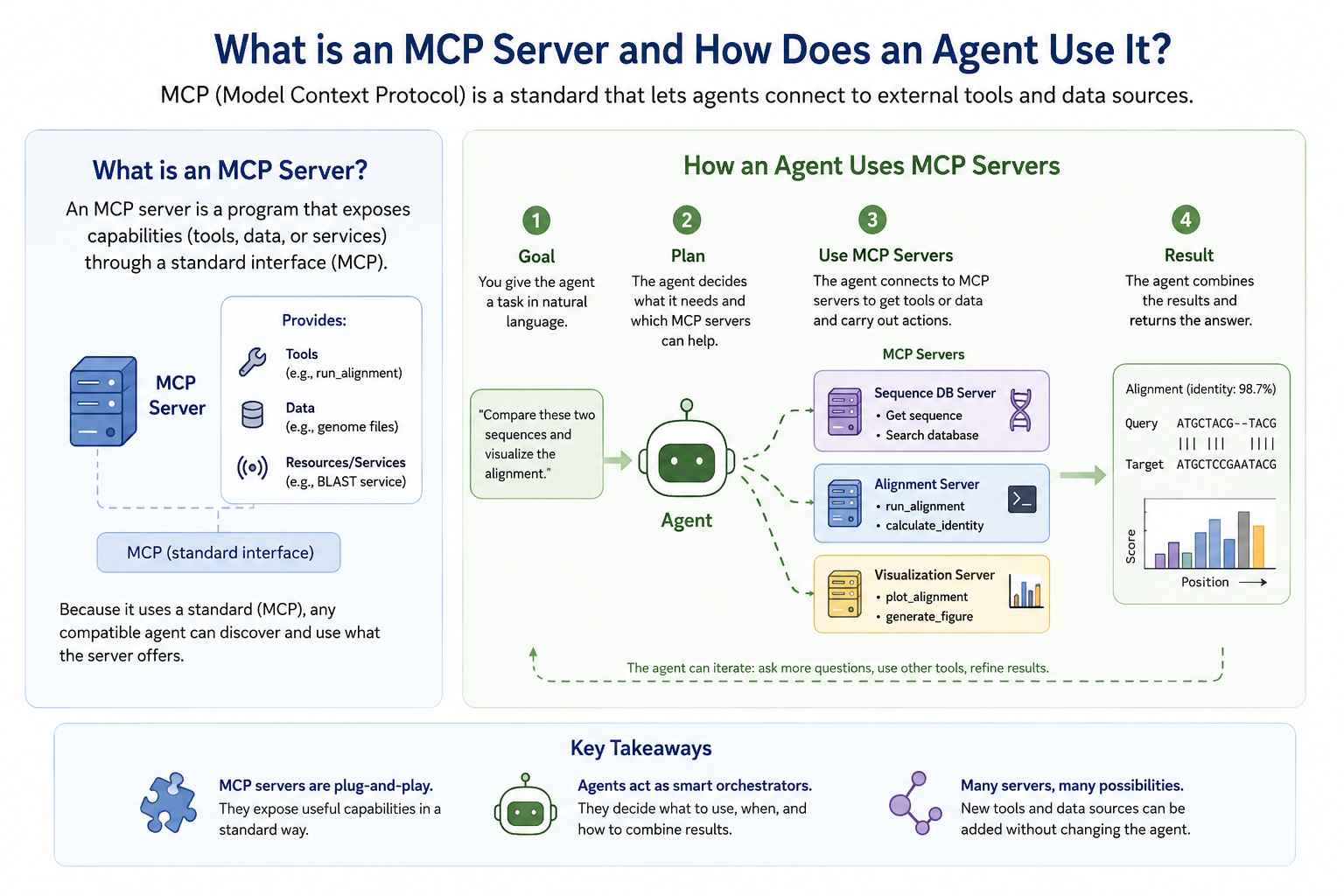
Another concept you have to learn before you deploy an agent with Claude SDK is MCP Servers. You can think of an MCP server as an advanced version of a tool. MCP is an open standard for connecting AI agents to external systems.
A tool is a single callable function with a name, description, input schema and some logic that runs and returns a result. For example analyze_protein_sequence, summarize_protein_role from previous chapters are tools.
On the other hand, an MCP server is a container that hosts and exposes one or more tools over a standardized protocol. It allows the agent to discovery what tools it has rather than listing each tool one by one, executes the tool and return the results in a standard format. Again, a tool is a function, but an MCP server is an API service that exposes functions over a protocol.
With raw tool use, we wire everything manually; we write the JSON schema, if/elif dispatch. Then all of it lives in your agent code. It works, but the tools are tightly coupled to that one agent. If another project needs the same tool, we have to copy and rewire everything from scratch.
With MCP, the tools live in the server, which is a separate, reusable process. Any MCP-compatible client (Claude, Cursor, your own agent, someone else’s agent) can connect to it and immediately discover and use those tools — without you writing any glue code. The server is the shareable, deployable unit.
3.4.3 Changes from the previous approach#
Previous (native tool use) |
This notebook (MCP) |
|
|---|---|---|
Tools defined |
Inline Python functions + JSON schema |
MCP Server that advertises tools automatically |
Tool execution |
Manual |
MCP protocol handles dispatch |
Reusability |
Single notebook |
Server can be reused across any MCP-compatible client |
Multi-tool scaling |
Grows complex fast |
Plug-and-play: add a new server, get new tools |
3.4.4 Implement an agent with Claude Agent SDK + MCP Servers#
Step 1 — Install dependencies#
If you’re using Google Colab to run this notebook, make sure to install the requirements using the cell below. If you’re using Binder, then you don’t have to do anything.
!uv pip install -q anthropic mcp uvicorn biopython==1.86
Step 2 — Load API key#
Make sure you have correctly added the API key to the environment.
import os

LLM_API_KEYS = {
    "openai":    "OPENAI_API_KEY",
    "anthropic": "ANTHROPIC_API_KEY",
}

def get_api_key(llm: str = "anthropic") -> str:
    """
    Load API key for the specified LLM from Colab secrets,
    environment variable, or user input.

    Args:
        llm: LLM provider name. eg: 'openai', 'anthropic'

    Returns:
        API key string

    Example:
        api_key = get_api_key("anthropic")
    """

    llm = llm.lower()
    if llm not in LLM_API_KEYS:
        raise ValueError(
            f"Unknown LLM '{llm}'. Choose from: {list(LLM_API_KEYS.keys())}"
        )

    env_var = LLM_API_KEYS[llm]

    # 1. Try Colab secrets
    try:
        from google.colab import userdata
        key = userdata.get(env_var)
        if key:
            return key
    except ImportError:
        pass

    # 2. Try environment variable / .env file
    try:
        from dotenv import load_dotenv
        load_dotenv()
        key = os.environ.get(env_var)
        if key:
            return key
    except ImportError:
        pass

    raise ValueError(
        f"API key not found. Please set {env_var}:\n"
        f"  export {env_var}='your-key-here'\n"
        f"  or add it to a .env file"
    )
Step 3 — Write the MCP Server to disk and start it#
An MCP server is a standalone Python script that exposes tools over HTTP. We write it to disk so it can run as a separate process alongside this notebook.
server_code = '''
#!/usr/bin/env python
"""
bio_tools_server.py — MCP Server exposing two bioinformatics tools:
  1. analyze_protein_sequence  — biophysical properties via BioPython
  2. summarize_protein_role    — biological context summary via Claude
"""
import os
import anthropic
from mcp.server.fastmcp import FastMCP
from mcp.server.transport_security import TransportSecuritySettings
from Bio.SeqUtils.ProtParam import ProteinAnalysis

# FastMCP auto-generates the JSON schema from type hints and docstrings.
# No manual schema writing needed!
mcp = FastMCP("bio_tools", transport_security=TransportSecuritySettings(
    enable_dns_rebinding_protection=False
))

client = anthropic.Anthropic(api_key=os.environ["ANTHROPIC_API_KEY"])


@mcp.tool()
def analyze_protein_sequence(sequence: str) -> dict:
    """
    Analyze a protein amino acid sequence and return biophysical properties.

    Args:
        sequence: Protein sequence in one-letter amino acid code (e.g. \"MKTII...\")

    Returns:
        Dictionary with length, molecular_weight_Da, isoelectric_point,
        instability_index, gravy_score, amino_acid_percent, is_stable,
        and is_hydrophilic.
    """
    sequence = sequence.upper().strip()
    analysis = ProteinAnalysis(sequence)
    results = {
        "length":              len(sequence),
        "molecular_weight_Da": round(analysis.molecular_weight(), 2),
        "isoelectric_point":   round(analysis.isoelectric_point(), 2),
        "instability_index":   round(analysis.instability_index(), 2),
        "gravy_score":         round(analysis.gravy(), 3),
        "amino_acid_percent":  {
            aa: round(pct, 1)
            for aa, pct in analysis.amino_acids_percent.items()
            if pct > 0
        },
    }
    results["is_stable"]      = results["instability_index"] < 40
    results["is_hydrophilic"] = results["gravy_score"] < 0
    return results


@mcp.tool()
def summarize_protein_role(protein_name: str, organism: str) -> dict:
    """
    Summarize the biological role, disease association, and drug-target
    relevance of a named protein.

    Args:
        protein_name: Common name or gene symbol (e.g. \"EGFR\", \"p53\")
        organism:     The organism (e.g. \"human\", \"mouse\")

    Returns:
        Dictionary with a \"summary\" key containing a 3-4 sentence description.
    """

    response = client.messages.create(
        model="claude-opus-4-5",
        max_tokens=400,
        messages=[{
            "role": "user",
            "content": (
                f"Provide a concise 3–4 sentence summary of the protein \'{protein_name}\' "
                f"in {organism}. Cover: (1) its biological function, "
                f"(2) which disease or condition it is associated with, "
                f"(3) why it is considered a drug target. Be factual and concise."
            )
        }]
    )
    return {"summary": response.content[0].text}


if __name__ == "__main__":
    import uvicorn
    app = mcp.streamable_http_app()
    uvicorn.run(app, host="0.0.0.0", port=8002)
'''
# for Colab: save to content folder
# if you're running this file locally, you can save it to any folder
with open("/content/bio_tools_server.py", "w") as f:
    f.write(server_code)

print("✅ bio_tools_server.py written to disk.")
Step 3a - Start the MCP server#
# Check the server is actually reachable before running the agent
import os, sys, subprocess, time

# Stop any previously running server
prev = globals().get("server_process")
if prev and prev.poll() is None:
    prev.terminate(); prev.wait(timeout=5)

server_process = subprocess.Popen(
    [sys.executable, "bio_tools_server.py"],
    env={**os.environ, "ANTHROPIC_API_KEY": get_api_key()},
    stdout=subprocess.PIPE,
    stderr=subprocess.PIPE,
)
time.sleep(5)

# Read any stderr output from the server
err = server_process.stderr.read1(4096).decode()  # non-blocking peek
if err:
    print("Server stderr:", err)

# 1. Is the process still alive?
if server_process.poll() is not None:
    print("❌ Server process has died. Stderr:")
    print(server_process.stderr.read().decode())
else:
    print("✅ Server process is running")
Step 3b — Start a tunnel and paste the URL#
Connect the MCP server to a public HTTPS URL.
Why a public URL? Anthropic’s API calls your MCP server from the cloud, so it needs an
https://address it can reach. We use cloudflared to create a free public tunnel to the server running inside Colab — no account or configuration required.
We use cloudflared to create a free tunnel — no account needed.
1. Install cloudflared (if you haven’t already)
Mac:
brew install cloudflaredLinux/Google Colab terminal: run this in the terminal:
curl -L https://github.com/cloudflare/cloudflared/releases/latest/download/cloudflared-linux-amd64 -o cloudflared
  chmod +x cloudflared
2. Open a terminal
Google Colab: Click Terminal button on the bottom-left corner
Local Jupyter / VS Code: open any terminal
3. Run the tunnel command:
Mac/Linux
cloudflared tunnel --url http://127.0.0.1:8002
Google Colab Terminal (after downloading above)
./cloudflared tunnel --url http://127.0.0.1:8002
Do not run this in a notebook cell with ! — it blocks the kernel and no other cells will run.
4. Wait a few seconds until cloudflared prints a line like. Read through the terminal logs to identify the correct URL.
https://abc-def-123.trycloudflare.com
Copy that URL, paste it into the cell below, and run it.
Do not close the terminal as we want to keep the Cloudflare tunnel open.
# Paste your cloudflared URL here (e.g. https://xxxx.trycloudflare.com)
tunnel_url = " https://xxxx.trycloudflare.com"
Now let’s make sure if we can connect to the MCP server
import urllib.request

mcp_url = tunnel_url.rstrip("/") + "/mcp"
mcp_server_config = {"type": "url", "url": mcp_url, "name": "bio_tools"}
print(f"✅ MCP URL set: {mcp_url}")

req = urllib.request.Request(
    mcp_server_config["url"],
    headers={"Accept": "application/json, text/event-stream"}
)

try:
    with urllib.request.urlopen(req, timeout=10) as r:
        print(f"✅ Reachable: HTTP {r.status}")
except urllib.error.HTTPError as e:
    print(f"HTTP {e.code} — tunnel is up but server rejected the request (this is OK)")
except Exception as e:
    print(f"❌ Not reachable: {e}")
Step 4 — Build the MCP Client + Agent Loop#
The Anthropic Python SDK talks to the remote MCP connector on the Messages API.
Key pieces (see MCP connector):
mcp_servers— connection details for each remote server (HTTPS URL +name)tools=[{"type": "mcp_toolset", "mcp_server_name": "<name>"}]— required; enables tools from that server (you can allowlist/denylist tools in this object)betas=["mcp-client-2025-11-20"]— beta header for the connector
You still write a small agent loop for multi-turn conversation; the connector runs MCP tools and returns mcp_tool_use / mcp_tool_result blocks.
from anthropic import Anthropic

client = Anthropic(api_key=get_api_key(llm="anthropic"))

print("Anthropic client ready.")

SYSTEM_PROMPT = """You are a computational biology assistant specializing in drug discovery.
When given a protein of interest, you:
1. Use analyze_protein_sequence to compute its biophysical properties.
2. Use summarize_protein_role to understand its biological context.
3. Combine both results to generate 2–3 specific, testable drug discovery hypotheses.

Always explain your reasoning in plain language suitable for a bench biologist."""


def run_agent_mcp(user_question: str, verbose: bool = True) -> str:
    """
    Runs the drug discovery agent using MCP for tool discovery and execution.

    Claude auto-discovers tools from bio_tools_server.py — no manual tool
    definitions or dispatch logic required here.
    """
    if mcp_server_config is None:
        raise RuntimeError(
            "mcp_server_config is None — the MCP server did not start. "
            "Re-run the server cell and check STDERR / ANTHROPIC_API_KEY."
        )
    tools_for_request = [{"type": "mcp_toolset", "mcp_server_name": mcp_server_config["name"]}]

    messages = [{"role": "user", "content": user_question}]

    if verbose:
        print(f"🧪 Question: {user_question[:120]}...\n")
        print("─" * 60)

    # Agent loop — same structure as before, but Claude handles tool routing
    while True:
            full_response = ""
            content_blocks = []

            with client.beta.messages.stream(
                model="claude-opus-4-7",
                max_tokens=8192,
                system=SYSTEM_PROMPT,
                messages=messages,
                mcp_servers=[mcp_server_config],
                tools=[{"type": "mcp_toolset", "mcp_server_name": "bio_tools"}],
                betas=["mcp-client-2025-11-20"],
            ) as stream:
                for event in stream:
                    if hasattr(event, "type"):
                        if event.type == "content_block_delta" and hasattr(event.delta, "text"):
                            print(event.delta.text, end="", flush=True)
                            full_response += event.delta.text

                response = stream.get_final_message()

            content_blocks = response.content

            if response.stop_reason == "end_turn":
                print()
                return full_response

            elif response.stop_reason in ("tool_use", "mcp_tool_use"):
                if verbose:
                    for block in content_blocks:
                        if hasattr(block, "name"):
                            print(f"\n🔧 MCP tool called: {block.name}")
                            if hasattr(block, "input"):
                                print(f"   Inputs: {block.input}")
                messages.append({"role": "assistant", "content": content_blocks})

            else:
                print(f"\n⚠️  Unexpected stop reason: {response.stop_reason}")
                break
egfr_sequence_fragment = (
    "MRPSGTAGAALLALLAALCPASRALEEKKVCQGTSNKLTQLGTFEDHFLSLQRMFNNCEVVLGNLEITYVQRNYDLSFLKTIQ"
    "EVAGYVLIALNTVERIPLENLQIIRGNMYYENSYALAVLSNYDANKTGLKELPMRNLQEILHGAVRFSNNPALCNVESIQWRD"
    "IVSSDFLSNMSMDFQNHLGSCQKCDPSCPNGSCWGAGEENCQKLTKIICAQQCSGRCRGKSPSDCCHNQCAAGCTGPRESDCL"
    "VCRKFRDEATCKDTCPPLMLYNPTTYQMDVNPEGKYSFGATCVKKCPRNYVVTDHGSCVRACGADSYEMEEDGVRKCKKCEG"
    "PCRKVCNGIGIGEFKDSLSINATNIKHFKNCTSISGDLHILPVAFRGDSFTHTPPLDPQELDILKTVKEITGFLLIQAWPENR"
)

question = f"""
I'm studying the role of EGFR in non-small-cell lung cancer.
Here is a fragment of its amino acid sequence:

{egfr_sequence_fragment}

Please analyze this protein and help me think about potential
small-molecule drug targeting strategies.
"""

answer = run_agent_mcp(question, verbose=True)
Scaling up: adding more tools#
The power of MCP is that adding new tools requires only editing the server. The agent loop above stays unchanged.
Here’s how you’d add a PubMed search tool — add this to bio_tools_server.py:
import urllib.request, json

@mcp.tool()
def search_pubmed(query: str, max_results: int = 5) -> dict:
    """
    Search PubMed for recent papers about a protein or drug target.

    Args:
        query:       Search term, e.g. "EGFR inhibitors lung cancer"
        max_results: Number of results to return (default 5)
    """
    base = "https://eutils.ncbi.nlm.nih.gov/entrez/eutils/"
    search_url = f"{base}esearch.fcgi?db=pubmed&term={urllib.parse.quote(query)}&retmax={max_results}&retmode=json"
    with urllib.request.urlopen(search_url) as r:
        ids = json.load(r)["esearchresult"]["idlist"]
    return {"pubmed_ids": ids, "query": query}
After saving, Claude will discover and use search_pubmed automatically on the next run — no changes to your agent loop needed.
Claude Skills#
While you can write as many MCP servers as you’d want, you can also use already built MCP servers called Claude skills. These are usually built by Anthropic or the community. So, instead of writing your own bio_tools_server.py, someone already wrote a “PubMed skill” or “UniProt skill” that you just plug in. The “portable” part means the same skill can be reused across different agents and projects — you don’t rebuild it every time.
Tip
Without skills: you write every tool yourself
With skills: you plug in pre-built capability packages
Summary#
Step |
What happened |
|---|---|
1 |
Wrote |
2 |
Ran the server locally and registered it with the API via |
3 |
Claude loaded tool schemas from the MCP server — no hand-written JSON schema in the agent |
4 |
Claude called tools via MCP; dispatch was handled by the protocol |
5 |
Claude synthesized results into drug discovery hypotheses |
MCP separates tool logic (the server) from agent logic (the loop), making each independently reusable, testable, and shareable.