

3.3 Deploy Agents with Anthropic’s Native Tool Use#
In chapter 3.2 we learned how to implement an agent from scratch using python libraries. In this chapter we’ll learn how implement an agent using Anthropic’s native tool use.
Compared to chapter 3.2, the imports here are minimal — since we’re using Anthropic’s native tool
use, we don’t need ldp or any agent framework. The only library we need is the anthropic Python
package, which provides a straightforward client for interacting with Claude. But cost and flexibility are downsides here.
We’ll use the same problem setup and tools as in chapter 3.2. The agent is built to analyze protein data and generate hypothesis for drug discovery.
Tools:
analyze_protein_sequence— computes basic biophysical propertiessummarize_protein_role— asks the AI to summarize biological context
🚀 How to run the notebook
This tutorial can be launched using the rocket button at the top of the page.
Option 1 — Google Colab (recommended)#
Opens the notebook in Google Colab with the fastest and most reliable experience.
Before running the tutorial, add your API keys using either:
a
.envfile, orColab Secrets (
🔑 Secretstab in the left sidebar)
Example .env:
OPENAI_API_KEY=your_key_here
ANTHROPIC_API_KEY=your_key_here
Option 2 — MyBinder#
Launches a temporary cloud Jupyter environment directly in your browser.
⚠️ Binder environments can take a few minutes to build and start.
After the notebook loads, create a .env file in the notebook directory containing your API keys:
OPENAI_API_KEY=your_key_here
ANTHROPIC_API_KEY=your_key_here
Notes#
You only need API keys for the providers used in a given notebook.
Never commit or publicly share your API keys.
If a cell fails due to missing credentials, verify that your keys were loaded correctly before rerunning the cell.
If you’re using Google Colab, make sure to install the requirements using the cell below. You don’t have to do this if you’re using Binder.
!uv pip install anthropic biopython==1.86
Make sure you have set up your API key before running the following cells.
import os

LLM_API_KEYS = {
    "openai":    "OPENAI_API_KEY",
    "anthropic": "ANTHROPIC_API_KEY",
}

def get_api_key(llm: str = "anthropic") -> str:
    """
    Load API key for the specified LLM from Colab secrets,
    environment variable, or user input.

    Args:
        llm: LLM provider name. eg: 'openai', 'anthropic'

    Returns:
        API key string

    Example:
        api_key = get_api_key("anthropic")
    """

    llm = llm.lower()
    if llm not in LLM_API_KEYS:
        raise ValueError(
            f"Unknown LLM '{llm}'. Choose from: {list(LLM_API_KEYS.keys())}"
        )

    env_var = LLM_API_KEYS[llm]

    # 1. Try Colab secrets
    try:
        from google.colab import userdata
        key = userdata.get(env_var)
        if key:
            return key
    except ImportError:
        pass

    # 2. Try environment variable / .env file
    try:
        from dotenv import load_dotenv
        load_dotenv()
        key = os.environ.get(env_var)
        if key:
            return key
    except ImportError:
        pass

    raise ValueError(
        f"API key not found. Please set {env_var}:\n"
        f"  export {env_var}='your-key-here'\n"
        f"  or add it to a .env file"
    )
3.3.1 Set up the LLM client#
We instantiate the client using our API key, which will be used for all subsequent calls to the model. Think of the client as a messenger between your Python code and Anthropic’s servers. When you want Claude to do something, you don’t communicate with it directly over the internet yourself. Instead, you hand your request to the client object, which handles the networking, authentication, and formatting behind the scenes, and brings the response back to you. All subsequent interactions with Claude in this chapter will go through this client.
import anthropic

# Connect to the Claude AI model.
# Make sure you have set your API key as an environment variable.
client = anthropic.Anthropic(api_key=get_api_key(llm="anthropic"))

print("Libraries loaded and client ready.")
3.3.2 Define the tools#
As we discussed previously, tools are Python functions our agent can choose to call. Before deploying the agent, we need to tell Claude what tools it has access to and how to use them.
With Anthropic’s native tool use, tools are defined as JSON schemas and passed directly to the API and
no external libraries are required. Each tool definition includes a name, a description that helps
Claude decide when to use it, and an input_schema that specifies what parameters the tool expects.
Below we define our two tools:
analyze_protein_sequence: takes an amino acid sequence and returns biophysical properties like molecular weight and isoelectric point.summarize_protein_role: takes a protein name and returns a plain-language summary of its biological function.
# ── TOOL 1: Analyze a protein sequence ──────────────────────────────────────
def analyze_protein_sequence(sequence: str) -> dict:
    """
    Takes a protein sequence (one-letter amino acid codes, e.g. 'MKTIIALSYIFCLVFA...')
    and returns basic biophysical properties using BioPython.
    """
    from Bio.SeqUtils.ProtParam import ProteinAnalysis

    sequence = sequence.upper().strip()
    analysis = ProteinAnalysis(sequence)

    results = {
        "length":              len(sequence),
        "molecular_weight_Da": round(analysis.molecular_weight(), 2),
        "isoelectric_point":   round(analysis.isoelectric_point(), 2),
        "instability_index":   round(analysis.instability_index(), 2),
        "gravy_score":         round(analysis.gravy(), 3),   # hydrophobicity
        "amino_acid_percent":  {
            aa: round(pct, 1)
            for aa, pct in analysis.amino_acids_percent.items()
            if pct > 0   # only show amino acids actually present
        },
    }

    # Interpret some values for the non-expert
    results["is_stable"]     = results["instability_index"] < 40
    results["is_hydrophilic"] = results["gravy_score"] < 0

    return results


print("Libraries loaded and client ready.")
# ── TOOL 2: Summarize protein biological role ────────────────────────────────

def summarize_protein_role(protein_name: str, organism: str) -> dict:
    """
    Uses a separate Claude call to look up and summarize the biological
    role of a protein from its training knowledge.
    """
    import anthropic

    client = anthropic.Anthropic(api_key=get_api_key(llm="anthropic"))

    response = client.messages.create(
        model="claude-opus-4-5",
        max_tokens=400,
        messages=[{
            "role": "user",
            "content": (
                f"Provide a concise 3–4 sentence summary of the protein '{protein_name}' "
                f"in {organism}. Cover: (1) its biological function, "
                f"(2) which disease or condition it is associated with, "
                f"(3) why it is considered a drug target. Be factual and concise."
            )
        }]
    )
    return {"summary": response.content[0].text}
After writing the python functions for the two tools, we have to format the tool definition using JSON schemas and pass directly to the API.
tools = [
    {
        "name": "analyze_protein_sequence",
        "description": (
            "Analyzes a raw protein amino acid sequence and returns biophysical "
            "properties: length, molecular weight, isoelectric point, instability "
            "index, GRAVY hydrophobicity score, and amino acid composition."
        ),
        "input_schema": {
            "type": "object",
            "properties": {
                "sequence": {
                    "type": "string",
                    "description": "The protein sequence in one-letter amino acid code, e.g. 'MKTII...'"
                }
            },
            "required": ["sequence"]
        }
    },
    {
        "name": "summarize_protein_role",
        "description": (
            "Summarizes the known biological role, disease association, and "
            "drug-target relevance of a named protein in a given organism."
        ),
        "input_schema": {
            "type": "object",
            "properties": {
                "protein_name": {
                    "type": "string",
                    "description": "Common name or gene symbol of the protein, e.g. 'EGFR' or 'p53'"
                },
                "organism": {
                    "type": "string",
                    "description": "The organism, e.g. 'human', 'mouse', 'E. coli'"
                }
            },
            "required": ["protein_name", "organism"]
        }
    }
]

print("Tools defined.")
3.3.3 Build the agent loop#
At the heart of the agent is a back-and-forth conversation between your code and Claude. This loop continues until Claude has enough information to answer the question.
Unlike a standard API call where you send a prompt and get a response, tool use is inherently iterative: Claude may need to call analyze_protein_sequence, inspect the result, and then decide to also call summarize_protein_role before it can draw a conclusion. Each tool result gets added back into the conversation so Claude always has full context of what it has already looked up. The logic follows a straightforward cycle as shown below.
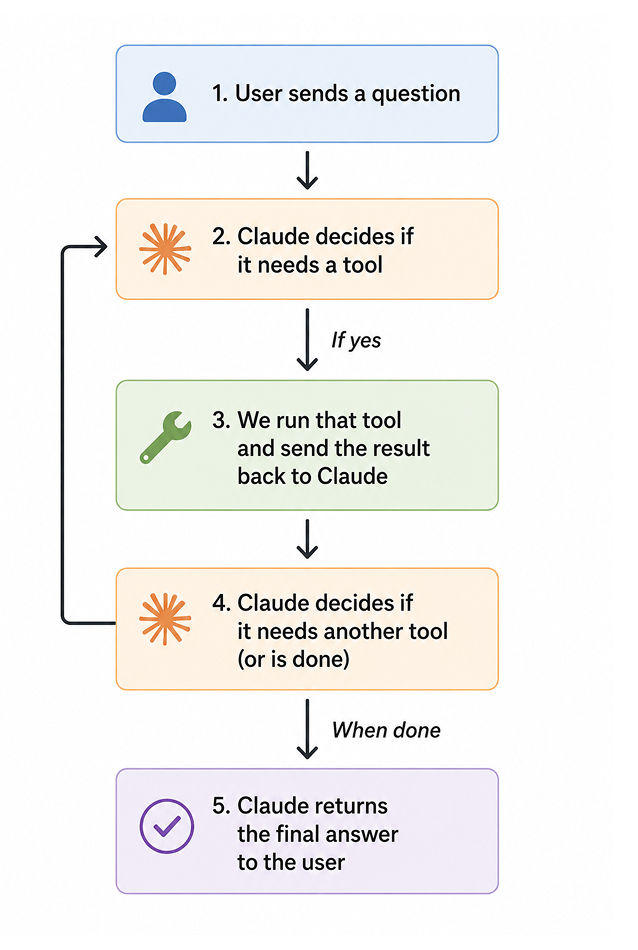
📝 Note The LLM doesn’t run the tools itself. It simply tells you which tool it wants to call and what arguments to pass. Your code is responsible for actually executing the tool and returning the result.
def run_agent(user_question: str, verbose: bool = True) -> str:
    """
    Runs the drug discovery agent on a user question.

    Parameters
    ----------
    user_question : str
        The scientist's question (see examples below).
    verbose : bool
        If True, prints each reasoning step — great for learning!

    Returns
    -------
    str
        The agent's final answer.
    """
    import anthropic

    client = anthropic.Anthropic(api_key=get_api_key(llm="anthropic"))

    # A system prompt that sets the agent's personality and goals
    system_prompt = """You are a computational biology assistant specializing in drug discovery. When given a protein of interest, you:
    1. Use the analyze_protein_sequence tool to compute its biophysical properties.
    2. Use the summarize_protein_role tool to understand its biological context.
    3. Combine both results to generate 2–3 specific, testable drug discovery hypotheses.

    Always explain your reasoning in plain language suitable for a bench biologist."""

    messages = [{"role": "user", "content": user_question}]

    if verbose:
        print(f"🧪 Question: {user_question}\n")
        print("─" * 60)

    # ── Agent loop ────────────────────────────────────────────────────────────
    while True:
        response = client.messages.create(
            model="claude-opus-4-5",
            max_tokens=1500,
            system=system_prompt,
            tools=tools,
            messages=messages
        )

        # Did the model decide to call a tool?
        if response.stop_reason == "tool_use":

            # Collect all tool calls in this response
            tool_results = []

            for block in response.content:
                if block.type == "tool_use":
                    tool_name   = block.name
                    tool_inputs = block.input
                    tool_id     = block.id

                    if verbose:
                        print(f"🔧 Agent is calling tool: {tool_name}")
                        print(f"   Inputs: {tool_inputs}")

                    # ── Dispatch: call the right Python function ──────────────
                    if tool_name == "analyze_protein_sequence":
                        result = analyze_protein_sequence(**tool_inputs)
                    elif tool_name == "summarize_protein_role":
                        result = summarize_protein_role(**tool_inputs)
                    else:
                        result = {"error": f"Unknown tool: {tool_name}"}

                    if verbose:
                        print(f"   ✅ Result: {result}\n")

                    tool_results.append({
                        "type":        "tool_result",
                        "tool_use_id": tool_id,
                        "content":     str(result)
                    })

            # Send ALL tool results back to the model in one message
            messages.append({"role": "assistant", "content": response.content})
            messages.append({"role": "user",  "content": tool_results})

        # The model is done — it returned its final answer
        elif response.stop_reason == "end_turn":
            final_answer = response.content[0].text

            if verbose:
                print("─" * 60)
                print("🤖 Agent's Final Answer:\n")
                print(final_answer)

            return final_answer

        # Safety valve: stop if something unexpected happens
        else:
            print(f"⚠️  Unexpected stop reason: {response.stop_reason}")
            break
3.3.4 Test the agent#
Now tet’s try our agent on a classic drug target: EGFR (Epidermal Growth Factor Receptor), a key protein in many cancers.
We’ll provide a short fragment of its sequence so the notebook runs quickly. In a real workflow, you’d paste the full sequence from UniProt.
In this example let’s use a truncated fragment of human EGFR (from UniProt P00533). You can find the full sequence from https://www.uniprot.org/uniprot/P00533
# Run the agent

egfr_sequence_fragment = (
    "MRPSGTAGAALLALLAALCPASRALEEKKVCQGTSNKLTQLGTFEDHFLSLQRMFNNCEVVLGNLEITYVQRNYDLSFLKTIQEVAGYVLIALNTVERIPLENLQIIRGNMYYENSYALAVLSNYDANKTGLKELPMRNLQEILHGAVRFSNNPALCNVESIQWRDIVSSDFLSNMSMDFQNHLGSCQKCDPSCPNGSCWGAGEENCQKLTKIICAQQCSGRCRGKSPSDCCHNQCAAGCTGPRESDCLVCRKFRDEATCKDTCPPLMLYNPTTYQMDVNPEGKYSFGATCVKKCPRNYVVTDHGSCVRACGADSYEMEEDGVRKCKKCEGPCRKVCNGIGIGEFKDSLSINATNIKHFKNCTSISGDLHILPVAFRGDSFTHTPPLDPQELDILKTVKEITGFLLIQAWPENRTDLHAFENLEIIRGRTKQHGQFSLAVVSLNITSLGLRSLKEISDGDVIISGNKNLCYANTINWKKLFGTSGQKTKIISNRGENSCKATGQVCHALCSPEGCWGPEPRDCVSCRNVSRGRECVDKCNLLEGEPREFVENSECIQCHPECLPQAMNITCTGRGPDNCIQCAHYIDGPHCVKTCPAGVMGENNTLVWKYADAGHVCHLCHPNCTYGCTGPGLEGCPTNGPKIPSIATGMVGALLLLLVVALGIGLFMRRRHIVRKRTLRRLLQERELVEPLTPSGEAPNQALLRILKETEFKKIKVLGSGAFGTVYKGLWIPEGEKVKIPVAIKELREATSPKANKEILDEAYVMASVDNPHVCRLLGICLTSTVQLITQLMPFGCLLDYVREHKDNIGSQYLLNWCVQIAKGMNYLEDRRLVHRDLAARNVLVKTPQHVKITDFGLAKLLGAEEKEYHAEGGKVPIKWMALESILHRIYTHQSDVWSYGVTVWELMTFGSKPYDGIPASEISSILEKGERLPQPPICTIDVYMIMVKCWMIDADSRPKFRELIIEFSKMARDPQRYLVIQGDERMHLPSPTDSNFYRALMDEEDMDDVVDADEYLIPQQGFFSSPSTSRTPLLSSLSATSNNSTVACIDRNGLQSCPIKEDSFLQRYSSDPTGALTEDSIDDTFLPVPEYINQSVPKRPAGSVQNPVYHNQPLNPAPSRDPHYQDPHSTAVGNPEYLNTVQPTCVNSTFDSPAHWAQKGSHQISLDNPDYQQDFFPKEAKPNGIFKGSTAENAEYLRVAPQSSEFIGA"
)

question = f"""
I'm studying the role of EGFR in non-small-cell lung cancer.
Here is a fragment of its amino acid sequence:

{egfr_sequence_fragment}

Please analyze this protein and help me think about potential small-molecule drug targeting strategies.
"""

answer = run_agent(question, verbose=True)
3.3.5 Recap of agent set up#
Step |
Agent Actions |
|---|---|
1️ |
Received your biology question |
2️ |
Decided to call |
3️ |
Decided to call |
4️ |
Combined both results → generated drug hypotheses |
Test this agent with a protein of your choice by re-running the agent with a new protein sequence. You can also add more tools such as literature searching or plotting tools to analyze your data. For example that you can use the RAG pipeline we learned in section 2.2 as a tool here to extract literature data.